
Deleting an account is a normal, common step, not something to panic about. People choose to delete apps for lots of simple reasons. Here are the most common, explained in everyday words:
- Privacy concerns. Maybe you don’t like how much personal information the app stores (messages, photos, contacts). Deleting the account removes your profile and stops the app from collecting more data about you.
- Switching to a different service. If you found another app that does the same job better, or all your friends moved, you might not need Atkapp anymore.
- Too many notifications / digital minimalism. Some people delete accounts to cut distractions and reclaim time.
- Security worries. If your account was compromised or you reused passwords, deleting the old account can be the safest option.
- Unwanted charges or subscriptions. If you can’t or don’t want to cancel billing tied to the account, deleting can be a final step after canceling payments.
- No longer using the service. If you haven’t used the app in months, deleting it cleans up your digital footprint.
Short version: deleting stops the account from being active, removes your visible profile, and usually removes or anonymizes your stored data (but, important, see the next section about exactly what “remove” means).
Understanding the Atkapp account deletion
Before you press “delete,” it helps to know the different options apps often offer and their consequences.
Deletion vs. Deactivation vs. Logging out: What each one means
- Logging out, you simply sign out on that device. Your account still exists on the company’s servers. Anyone can log back in later with your username and password.
- Deactivation (temporary disable), your profile may disappear from public view, but the company keeps your data, and you can usually reactivate (log back in) and restore everything.
- Deletion (permanent removal) is meant to remove your profile and associated data. In many services, deletion is permanent, but how permanent depends on the company’s rules (see below).
Important realities about “permanent” deletion
- Delayed or phased deletion: Many apps give a short “grace period” (for example, 7–30 days) where you can undo deletion. After that, the app begins permanent removal. This helps people who delete by mistake.
- Backups and legal retention: Even after deletion, a company may keep backups or logs for a while (security logs, legal holds, fraud prevention, or tax reasons). That means some bits of data might remain on company systems for months, but are usually inaccessible public.
- Shared content stays with others: If you sent messages, posted in groups, or shared files, copies of that content may still exist in other people’s accounts. Deleting your account usually doesn’t erase what other people saved.
- What gets removed: Profiles, private messages, saved files, and payment details are typically removed or anonymized. But always check the app’s privacy policy; exact rules vary.
- Recovery rules: Check whether the app allows account recovery after deletion. Some apps permanently delete immediately; others let you recover within a grace period.
Actionable tip: Before you delete, open Atkapp’s Help / Privacy page and search for “delete account,” “data retention,” or “account recovery.” That will tell you whether deletion is permanent, whether there’s a recovery window, and how long the service keeps backups.
Things to do before deleting your Atkapp account
Deleting is quick and final on many services, so do these steps first to avoid losing anything important.
A. Back up everything you might need
- Messages & chats: If the app lets you export chats, use that feature. If not, screenshot or copy important conversations.
- Photos, videos, and files: Download any photos, receipts, or documents you might later need.
- Contacts: If Atkapp stores contacts that you’ll need later, export them or save phone numbers to your phone/Google Contacts.
- Important account info: Save order numbers, invoices, subscription receipts, or any verification codes that appear only inside the app.
B. Cancel subscriptions and remove payment methods
- Cancel subscriptions inside the app or wherever you originally signed up (App Store, Google Play, or Atkapp’s website). Don’t rely on deletion alone to stop billing.
- Remove saved cards or PayPal details from your account if the app does not automatically remove them on deletion.
C. Unlink connected accounts and third-party access
- If you used Google, Facebook, Apple ID, or another single sign-on (SSO) to log in, unlink that connection. Also, revoke Atkapp access from those services’ account security pages.
- Check any third-party apps that had permission to access your Atkapp account, and remove their access.
D. Transfer or save ownership of groups/pages
- If you manage a group or business page, transfer admin rights to someone else. Otherwise, the group might be orphaned.
E. Check pending transactions and refunds
- Make sure there are no unresolved purchases or pending refunds. These can sometimes block deletion or create billing problems later.
F. Inform key contacts
- If people rely on you inside the app (clients, teammates), tell them when you plan to delete the account and how they can reach you afterward.
G. Make a recovery plan
- Note down your username and the email address you used. Keep confirmation emails from the service in case you need to contact support.
H. Take screenshots of tricky settings or proof of balance
- If your account holds credits, gift balances, or in-app coins, take a screenshot so you can contest anything later if needed.
Quick, printable pre-deletion checklist
- Export chats and download media
- Cancel subscriptions (App Store / Play Store / Atkapp)
- Remove payment methods
- Unlike Google/Facebook/Apple sign-in
- Transfer admin rights for groups/pages
- Verify no pending refunds or transactions.
- Notify contacts who need to know.
- Save screenshots of important info
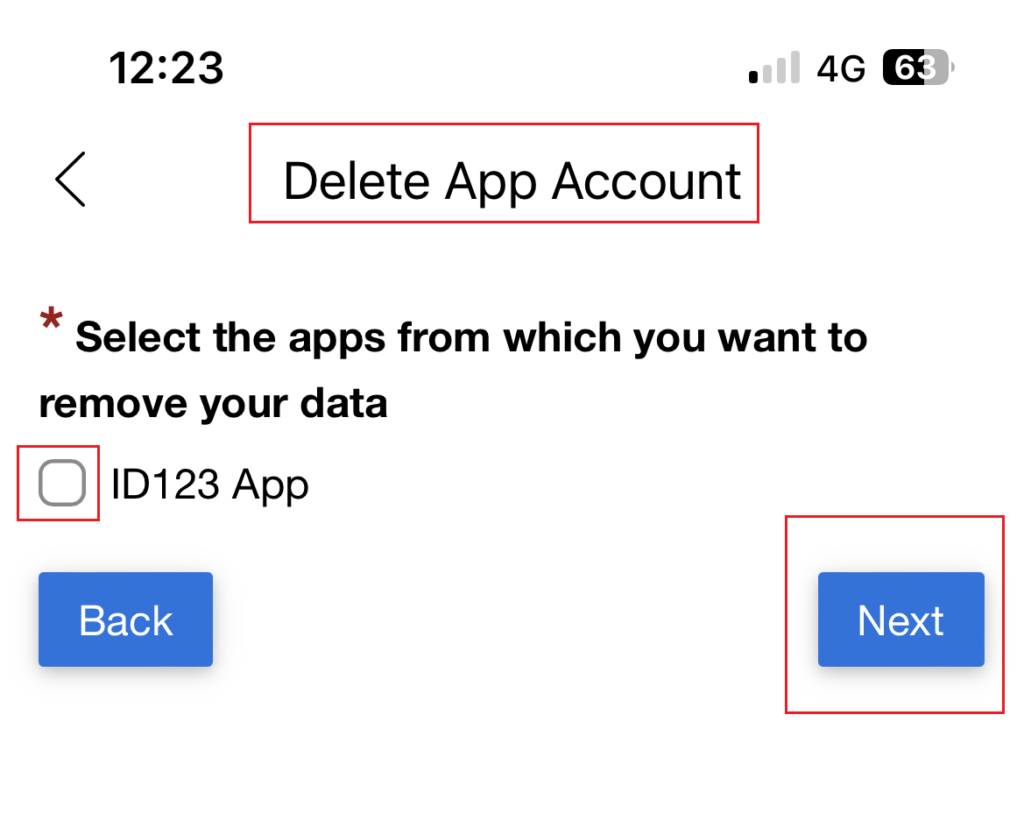
How to Delete Your Atkapp Account from the Mobile App
If you mostly use Atkapp on your phone, you can delete your account right inside the app. The process is usually quick, but the exact wording may vary slightly depending on whether you’re on Android or iOS (iPhone).
Here’s a step-by-step guide:
- Open the Atkapp app on your smartphone.
- Make sure you’re logged into the account you want to delete.
- Go to the menu or profile section.
- This is often represented by a profile picture, your initials, or a small menu icon (three lines or dots).
- Find “Settings” or “Account Settings.”
- Scroll down until you see something like “Account,” “Privacy,” or “Manage Account.”
- Look for “Delete Account” or “Close Account.”
- Sometimes it might be under “Security” or “Privacy Options.”
- Tap “Delete Account.”
- The app will likely warn you about what you’ll lose (messages, files, subscriptions, etc.).
- Confirm your decision.
- You may need to enter your password again, or you might get a verification code via email or SMS.
- Final confirmation.
- Once confirmed, your account will either be deleted immediately or moved into a “pending deletion” state (grace period).
Pro tip: If you can’t find the option, try using Atkapp’s search bar in settings (if available) and type “Delete”; it’s the fastest way to locate it.
How to Delete Your Atkapp Account from a Web Browser
If you use Atkapp on a computer or just prefer a bigger screen, deleting your account from the website is another option.
Here’s how to do it:
- Go to the official Atkapp website and log in to your account.
- Always check you’re on the real site (look for “https://” and the correct domain) to avoid phishing scams.
- Click on your profile picture or username in the top-right corner.
- Go to “Account Settings” or “Profile Settings.”
- This is where most personal info and privacy controls are stored.
- Look for the “Delete Account” option.
- Sometimes it’s inside a “Privacy” or “Security” tab.
- Click “Delete Account.”
- You’ll see a confirmation message explaining what will happen to your data.
- Enter your password to verify your identity.
- Complete any verification steps.
- This could be a code sent to your email, text message, or authentication app.
- Confirm and submit.
- Once done, you’ll see a message confirming your account deletion request.
Note: Some people find that deleting from a web browser shows extra options (like downloading your data before deletion) that the mobile app doesn’t display, so it’s worth checking.
How to Contact Atkapp Support for Account Deletion
Sometimes the delete button isn’t easy to find, or maybe you can’t log in at all. That’s when you’ll need to reach out directly to Atkapp’s customer support team.
Here’s how to do it:
A. Find the official support contact info.
- Go to the Atkapp Help Center or “Contact Us” page on their website.
- Look for options like Email Support, Live Chat, or Submit a Request.
B. Send a clear, polite email request.
If you can only contact them by email, make sure to include the important details:
- Your full name (as on the account).
- The email address or phone number linked to your Atkapp account.
- A direct request to permanently delete your account and remove all associated data.
- Any proof of identity they require (like your registered phone number).
Sample email template:
Subject: Request for Account Deletion – [Your Full Name]
Hello Atkapp Support Team,
I would like to request the permanent deletion of my Atkapp account linked to this email address: [Your Email]. Please remove all associated data as per your privacy policy.
Kindly confirm once the account has been deleted.
Thank you,
[Your Name]
C. If you’ve lost access to your account:
- Mention in your email that you can’t log in, and provide any identifying information they ask for.
- You may need to verify ownership by answering security questions or providing ID.
D. Follow up if needed.
- If you don’t hear back in 5–7 business days, send a polite follow-up email or try another contact method.
Pro tip: Always keep a copy of your communication with support, just in case you need proof later.
Troubleshooting Common Problems When Deleting Your Atkapp Account
Sometimes deleting your account isn’t as smooth as tapping a single button. Here are the most common issues people run into and how to fix them.
You forgot your password.
- Solution: Use the “Forgot Password” or “Reset Password” link on the login page.
- You’ll usually get a reset link by email or a code by SMS.
- Once your password is reset, log in and follow the deletion steps.
You can’t access your registered email or phone
- Solution: Contact Atkapp Support and explain the situation.
- Be ready to verify your identity; they may ask for your old username, recent activity, or even a photo of your ID.
The app isn’t loading properly.
- Solution: Try updating the app to the latest version.
- If that doesn’t work, uninstall and reinstall the app, then try again.
- Alternatively, try logging in from a web browser.
You’re stuck in a subscription.
- Solution: Cancel your subscription first via the App Store, Google Play Store, or Atkapp’s website.
- Many services won’t allow account deletion until all billing is canceled.
You have pending transactions.
- Solution: Wait until all purchases, refunds, or deliveries are processed before trying again.
- Contact support if these transactions are blocking your deletion request.
Pro tip: If you’ve tried everything and still can’t delete your account, send a detailed support request explaining exactly what you’ve already tried. This can speed up their help.
How Long Does It Take to Delete an Atkapp Account?
The time frame depends on Atkapp’s policy and whether your deletion is instant or goes through a pending period.
Typical process:
- Immediate deactivation: Your account stops being visible as soon as you confirm deletion.
- Grace period (7–30 days): Some apps keep your data temporarily in case you change your mind. You can log back in to cancel the deletion during this time.
- Final deletion: Once the grace period ends, your profile and stored data are permanently removed from Atkapp’s active systems.
Behind the scenes:
Even after “permanent” deletion, some data may remain in backups for a limited time (usually 30–90 days) for security and legal reasons. These backups are not accessible to normal users or staff for regular use.
Tip: If you want to be 100% sure your account is gone, set a reminder to check after the grace period ends. Try logging in; if it fails, your account is fully deleted.
What Happens After You Delete Your Atkapp Account?
Knowing what to expect after deletion can help avoid surprises.
You can’t log in anymore.
- Your username, password, and linked email/phone will no longer work with Atkapp.
Your profile disappears
- Your account will no longer appear in searches or friend lists.
- Any public posts or profile info is removed or anonymized.
Messages and shared content
- Private messages you sent may still be visible to the other person (just without your profile attached).
- Files you shared in group chats might remain unless deleted by group admins.
Subscriptions are gone
- Any premium features tied to your account will be canceled, and you won’t be billed again (assuming you canceled before deletion).
Account recovery (if offered)
- If Atkapp has a recovery window, you can log in before the deadline to restore your account. After that, recovery is impossible.
Linked accounts are disconnected.
- Your Atkapp connection to Google, Facebook, or Apple ID will automatically end.
Important: If you ever decide to join Atkapp again after full deletion, you’ll have to create a brand-new account; your old data can’t be restored.
Alternatives to Deleting Your Atkapp Account
Sometimes, you might feel ready to delete your account, but what you need could be a less permanent option. If you’re unsure, here are a few alternatives to consider:
Temporary Deactivation
- This hides your profile and activity from other users, but keeps all your data stored.
- You can come back anytime by logging in again; everything will be just as you left it.
- This is ideal if you just want a break, but might return in the future.
Logging Out
- This simply signs you out of Atkapp on your device.
- Your account stays active, but you won’t get notifications or see messages until you log back in.
- Great for reducing distractions without losing your account.
Disabling Notifications
- Turn off push notifications and email alerts in Settings or directly in your phone’s notification settings.
- This stops the constant pings while still letting you access the app when you choose.
Removing the App from Your Device
- Uninstalling Atkapp from your phone or tablet removes the temptation to use it.
- Your account and data remain intact on Atkapp’s servers, and you can reinstall the app anytime to resume using it.
Why these alternatives can help:
If you’re not 100% certain about deleting, trying a temporary step first can prevent regret later. Permanent deletion should only be used when you’re sure you’ll never want your account or data again.
Conclusion
Deleting your Atkapp account doesn’t have to be confusing or stressful. With the right preparation and a clear step-by-step plan, you can close your account quickly while making sure you don’t lose anything important. The most important things to remember are: back up your data, cancel any subscriptions, unlink connected accounts, and handle any pending payments or orders before you start the deletion process. This way, you won’t run into problems later or lose valuable information.
You can delete your account through the Atkapp mobile app or the website, and if you can’t find the option or access your account, Atkapp Support can help. Depending on the app’s policy, your account might be deactivated instantly or go through a short grace period before it’s permanently removed. Once deletion is complete, you won’t be able to log in again or recover your data, so be sure this is the right choice for you.
If you’re feeling unsure, remember there are alternatives. You could temporarily deactivate your account, log out, disable notifications, or even uninstall the app without deleting your data. These options give you the freedom to take a break without losing your account permanently.
